Meta description: Learn subnetting from scratch with simple examples. Understand IP addresses, subnet masks, CIDR, subnet calculations, VLSM, private IP addresses, and AWS VPC networking.
Subnetting is one of the most important concepts to understand when learning computer networking, cloud computing, and AWS. However, it can seem complicated when you first encounter IP addresses, subnet masks, binary numbers, and CIDR notation.
The good news is that subnetting becomes much easier when you break it down into simple steps.
Imagine you are learning how to divide a large school into smaller classrooms. Each classroom holds a group of students, and each group has its own space. Subnetting works similarly by dividing a large network into smaller networks.
In this guide, you will learn subnetting from the beginning, using simple explanations, practical examples, calculations, and exercises.
By the end, you should understand how to calculate subnets, identify network and broadcast addresses, determine usable host ranges, and apply subnetting concepts to AWS networking.
1. What Is an IP Address?
Imagine a town with hundreds of houses. Every house needs an address so that people can locate it and deliver letters.
Computers also need addresses to communicate with other devices over a network. An Internet Protocol (IP) address helps identify a device's network interface.
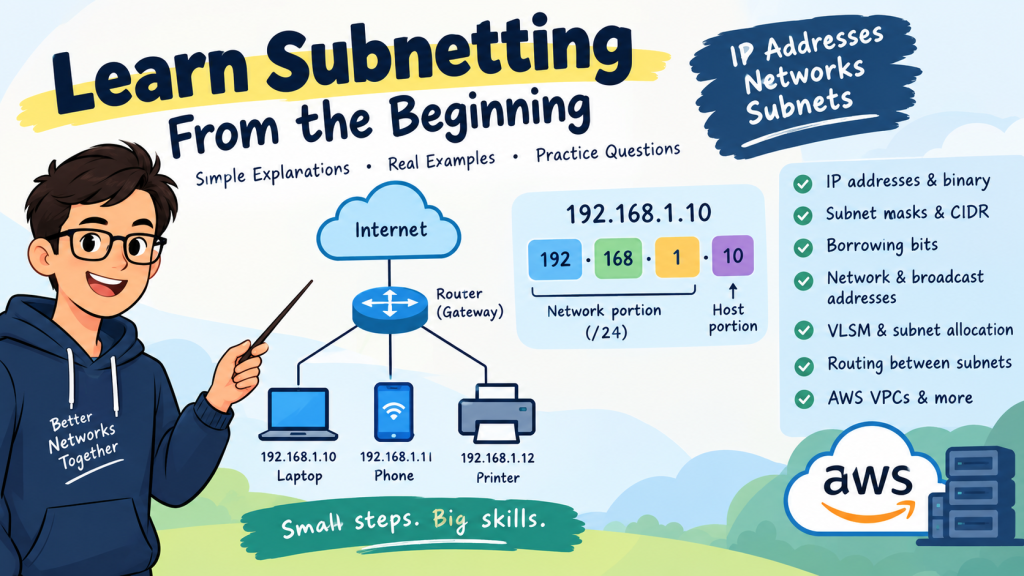
For example, a home network might contain these devices:
Laptop: 192.168.1.10
Smartphone: 192.168.1.11
Printer: 192.168.1.12
These are examples of IPv4 addresses.
An IPv4 address contains four numbers separated by dots:
192.168.1.10
Each number is called an octet and can range from 0 to 255.
Octet
Value
First
192
Second
168
Third
1
Fourth
10
An IPv4 address contains 32 bits in total, divided into four groups of eight bits.
Understanding this structure is the first step toward understanding subnetting.
2. What Are Bits and Binary Numbers?
Computers represent information using binary numbers. Binary uses only two digits: 0 and 1.
You can think of these values as switches:
0means OFF.
1means ON.
Each binary digit is called a bit. Eight bits form one octet.
The place values of eight bits are:
128, 64, 32, 16, 8, 4, 2, 1
Consider the binary number 11000000.
The first two positions contain 1, so we add their values:
128 + 64 = 192
Therefore:
11000000in binary equals 192in decimal.
You do not need to become an expert in binary conversion immediately, but understanding these place values will help you calculate subnet masks.
3. What Is a Network?
A network is a group of connected devices that can communicate with one another.
Consider these IPv4 addresses:
192.168.1.10
192.168.1.11
192.168.1.12
When configured with a /24prefix, these addresses belong to the same network:
192.168.1.0/24
The /24prefix indicates that the first 24 bits identify the network, while the remaining eight bits are available for addresses within that network.
An IPv4 address has 32 bits, so:
24 network bits + 8 host bits = 32 bits
The subnet mask for /24is:
255.255.255.0
The subnet mask tells devices which portion of an IP address identifies the network and which portion identifies the host.
4. What Is Subnetting?
Subnetting is the process of dividing a larger IP network into smaller networks called subnets.
Imagine a school with many classrooms. Instead of putting every student into one large classroom, the school divides students into smaller groups.
Network engineers use subnetting for similar reasons.
Subnetting helps organizations:
Organize devices into logical groups.
Separate departments and services.
Apply network security policies.
Use IP address space efficiently.
Design scalable networks.
Organize resources in cloud environments such as AWS.
For example, a hotel might use separate subnets for guest Wi-Fi, reception computers, office staff, and CCTV cameras.
Each subnet can have its own routing and security rules.
5. What Is a Subnet Mask?
A subnet mask identifies the network portion and host portion of an IPv4 address.
Here are some common CIDR prefixes and their corresponding subnet masks.
CIDR prefix
Subnet mask
/24
255.255.255.0
/25
255.255.255.128
/26
255.255.255.192
/27
255.255.255.224
/28
255.255.255.240
/29
255.255.255.248
/30
255.255.255.252
The number after the slash is called the CIDR prefix length.
For example:
/24means 24 network bits.
/25means 25 network bits.
/26means 26 network bits.
As the prefix length increases, the number of addresses in each subnet decreases.
6. Understanding Borrowed Bits
Let's use this network as an example:
192.168.10.0/24
The /24prefix leaves eight host bits in the final octet.
Suppose you want to divide this network into four smaller subnets.
You can borrow two bits from the host portion to create additional subnets.
The new prefix becomes:
24 + 2 = 26
Therefore, the new prefix is /26.
The corresponding subnet mask is:
255.255.255.192
After borrowing two bits, six host bits remain.
This gives us two important subnetting formulas.
Formula 1: Number of subnets
Number of subnets = 2ⁿ
Here, nrepresents the number of borrowed bits.
If you borrow two bits:
2² = 4 subnets
If you borrow three bits:
2³ = 8 subnets
Formula 2: Usable host addresses
For conventional IPv4 subnets, the formula is:
Usable hosts = 2ʰ − 2
Here, hrepresents the number of remaining host bits.
For a /26subnet, six host bits remain:
2⁶ = 64 total addresses
64 − 2 = 62 usable host addresses
The two excluded addresses are the network address and broadcast address.
Therefore, dividing 192.168.10.0/24into /26subnets creates four subnets with 62 usable host addresses each.
7. How to Calculate the Subnet Increment
The subnet increment helps you identify where each subnet begins.
Use this formula:
Subnet increment = 256 − subnet mask value in the changing octet
Consider the mask:
255.255.255.192
The changing octet is the fourth octet, which contains 192.
256 − 192 = 64
The subnet increment is 64.
Starting from zero, count in jumps of 64:
0, 64, 128, 192
These are the starting points of the four /26subnets within the original /24network.
Let's try another example.
Subnet mask:
255.255.255.224
Calculate:
256 − 224 = 32
The increment is 32.
The subnet boundaries are:
0, 32, 64, 96, 128, 160, 192, 224
This produces eight /27subnets within a /24network.
Remember that for prefixes shorter than /24, the changing octet may be the first, second, or third octet.
8. Network Address, Broadcast Address, and Host Range
Every conventional IPv4 subnet has a network address, a broadcast address, and a range of usable host addresses.
Let's examine:
192.168.10.64/26
The subnet increment is 64, and the next subnet begins at 192.168.10.128.
Therefore:
Network address:192.168.10.64
First usable host:192.168.10.65
Last usable host:192.168.10.126
Broadcast address:192.168.10.127
The broadcast address is the address immediately before the next subnet begins.
You can use these rules:
First usable host = network address + 1.
Broadcast address = next subnet's network address − 1.
Last usable host = broadcast address − 1.
Example: All Four /26 Subnets
Subnet
Network address
Usable host range
Broadcast address
1
192.168.10.0
192.168.10.1–62
192.168.10.63
2
192.168.10.64
192.168.10.65–126
192.168.10.127
3
192.168.10.128
192.168.10.129–190
192.168.10.191
4
192.168.10.192
192.168.10.193–254
192.168.10.255
Each subnet contains 64 total addresses, of which 62 are conventionally usable by hosts.
9. The Subnetting Cheat Sheet
The following table is useful for networking practice and certification exams.
Prefix
Total addresses
Usable hosts in conventional IPv4 subnets
Increment
/24
256
254
256
/25
128
126
128
/26
64
62
64
/27
32
30
32
/28
16
14
16
/29
8
6
8
/30
4
2
4
/31
2
Special point-to-point use
2
/32
1
One individual address
1
For /31, both addresses can be used as endpoints on supported point-to-point links. A /32identifies a single IPv4 address.
Notice the pattern: every time the prefix increases by one, the number of addresses is halved.
For example:
/26contains 64 addresses.
/27contains 32 addresses.
/28contains 16 addresses.
/29contains 8 addresses.
This happens because each additional network bit leaves one fewer host bit.
10. Subnetting a /16 Network
Subnetting does not always happen in the final octet.
Consider this network:
172.16.0.0/16
Suppose you want to divide it into /24networks.
The number of borrowed bits is:
24 − 16 = 8
The number of resulting subnets is:
2⁸ = 256
Some of the resulting networks are:
172.16.0.0/24
172.16.1.0/24
172.16.2.0/24
172.16.3.0/24
Each /24network contains 256 total addresses.
Understanding a /20 Network
Now consider:
172.16.0.0/20
Its subnet mask is:
255.255.240.0
The changing octet is the third octet.
Calculate the increment:
256 − 240 = 16
The subnet boundaries in the third octet are:
0, 16, 32, 48, 64, 80 ...
The first subnet has these properties:
Network address: 172.16.0.0
First usable host: 172.16.0.1
Last usable host: 172.16.15.254
Broadcast address: 172.16.15.255
The next subnet begins at 172.16.16.0.
The same increment method works regardless of which octet contains the subnet boundary.
11. Private and Public IP Addresses
Private IP addresses are intended for internal networks and are not directly routable across the public internet.
The three main private IPv4 ranges are:
Private CIDR range
Address range
10.0.0.0/8
10.0.0.0–10.255.255.255
172.16.0.0/12
172.16.0.0–172.31.255.255
192.168.0.0/16
192.168.0.0–192.168.255.255
For example, a router might assign your phone the private address 192.168.1.10.
Your phone can still access the internet through the router, which may use Network Address Translation (NAT).
Public IP addresses, on the other hand, are globally routable when properly assigned and configured.
Understanding private IP addresses is especially important when designing office networks, virtual private clouds, and cloud-based applications.
12. What Is VLSM?
VLSM stands for Variable Length Subnet Mask.
It allows network engineers to create subnets of different sizes within a larger address block.
Imagine an organization with these requirements:
Guest Wi-Fi needs 100 host addresses.
IT needs 50 host addresses.
Finance needs 25 host addresses.
HR needs 10 host addresses.
Giving every department the same large subnet would waste address space.
Instead, each department can receive a subnet that fits its requirements.
Department
Required hosts
Subnet
Usable hosts
Guest Wi-Fi
100
/25
126
IT
50
/26
62
Finance
25
/27
30
HR
10
/28
14
This is an example of VLSM.
A good practice is to allocate the largest subnet first, followed by smaller subnets, while ensuring that no subnet overlaps another.
13. How Subnetting Works in AWS
Subnetting is an important part of AWS networking.
Amazon Virtual Private Cloud (Amazon VPC) allows you to create an isolated virtual network for your cloud resources.
For example, you could create a VPC with the IPv4 CIDR block:
10.0.0.0/16
You could then divide it into smaller subnets:
Public subnet: 10.0.1.0/24
Private subnet: 10.0.2.0/24
A public subnet might host a public-facing load balancer, while a private subnet might contain application servers or databases.
In AWS, each subnet belongs to a specific Availability Zone.
A subnet is considered public when its routing configuration provides a route to an Internet Gateway. Resources also need appropriate IP addressing and security configuration to communicate as intended.
Private subnets typically do not have a direct route to an Internet Gateway. They may use a NAT Gateway for outbound internet access.
AWS Reserves Five IPv4 Addresses Per Subnet
One important difference between ordinary IPv4 subnet calculations and AWS VPC subnet calculations is that AWS reserves five IPv4 addresses in each subnet.
For example, the subnet 10.0.1.0/24contains 256 total addresses.
AWS reserves:
10.0.1.0— network address.
10.0.1.1— VPC router.
10.0.1.2— DNS mapping.
10.0.1.3— reserved for future use.
10.0.1.255— reserved by AWS.
Therefore, a /24subnet in an AWS VPC normally provides 251 available IPv4 addresses for your resources.
This is an important detail to remember when preparing for AWS certification exams.
14. A Five-Step Method for Solving Subnetting Questions
Whenever you encounter a subnetting problem, follow these steps.
Step 1: Identify the prefix.
Example: /26
Step 2: Find the subnet mask.
/26= 255.255.255.192
Step 3: Calculate the increment.
256 − 192 = 64
Step 4: Identify the subnet boundaries.
0, 64, 128, 192
Step 5: Calculate the network address, broadcast address, and usable host range.
For 192.168.10.64/26:
Network address: 192.168.10.64
First usable host: 192.168.10.65
Last usable host: 192.168.10.126
Broadcast address: 192.168.10.127
Following these steps will help you solve many standard IPv4 subnetting questions systematically.
15. Subnetting Practice Questions
Test your understanding with these beginner questions.
What does a /24prefix mean?
How many usable hosts does a conventional /26subnet contain?
What is the increment for the subnet mask 255.255.255.224?
How many subnets can you create by borrowing three bits?
What is the broadcast address of 192.168.1.64/26?
How many total addresses are in a /28subnet?
What is the first usable host address in 10.0.0.0/24?
How many IPv4 addresses does AWS reserve in each subnet?
Answers
24 network bits.
62 usable hosts.
Eight subnets.
192.168.1.127.
16 total addresses.
10.0.0.1.
Five IPv4 addresses.
Try solving the questions yourself before checking the answers.
Conclusion
Subnetting may seem difficult at first, but it becomes easier when you understand the basic concepts behind it.
Start by learning how IP addresses and subnet masks work. Then practise borrowing bits, calculating subnet increments, and identifying network addresses, broadcast addresses, and usable host ranges.
Once you understand these concepts, you can progress to VLSM, routing, and AWS VPC networking.
The most important thing is to practise regularly rather than trying to memorize every subnet mask at once.
With consistent practice, you will be able to calculate subnets confidently and apply these skills to real-world networking and cloud computing projects.
Build a strong foundation in computer networking with this beginner-friendly masterclass covering the OSI and TCP/IP models, network devices and protocols, encapsulation, Packet Tracer, Wireshark, binary mathematics, IP address conversion, and hexadecimal calculations. Includes practical labs, real-world examples, commands, and exercises to help you develop the skills needed for subnetting, routin
These topics are essential for Cisco networking, CCNA, AWS VPC networking, Linux administration, cybersecurity, and enterprise network design.
Our goal is not just to memorize IP addresses. By the end, you should be able to look at an IP address, calculate its network, identify its host range, determine the broadcast address, and understand how to divide a network into subnets.